

How to Get an EIN as a Non-US Resident for Free (2026)
After you form a U.S. LLC and receive its formation documents, applying for an EIN (the IRS federal tax ID) is an important step toward preparing for a business bank account and handling related tax matters. Non-US residents who meet IRS requirements can apply through Form SS-4 even if they do not have an SSN or ITIN.
This guide covers the information to prepare, how to submit Form SS-4, common mistakes, and how to compare free and paid fax tools when applying on your own.
What is an EIN?
An EIN (Employer Identification Number) is a nine-digit federal tax ID assigned by the IRS to identify a business for tax purposes. Applying for an EIN directly through the IRS is free. It is separate from your LLC formation documents. Forming an LLC with a state does not automatically give you an EIN. Unless a formation service has already applied for one on your behalf, you still need to apply to the IRS.
You may need an EIN to open a business bank account, file certain federal tax returns, or hire employees. Payment processors and e-commerce platforms may also ask for one. Not every LLC is legally required to have an EIN, but many non-US residents use one soon after forming their company.
An EIN identifies your business; it does not replace your personal SSN or ITIN. You do not need to be a U.S. citizen or resident to apply.
How can you apply without an SSN?
Can you apply for an EIN without an SSN or ITIN?
Yes. The IRS allows eligible applicants to obtain an EIN without an SSN or ITIN. The IRS online application is available only when the Responsible Party has a valid SSN or ITIN, so non-US residents without either number can submit Form SS-4 by fax or mail.
If the Responsible Party does not have an SSN or ITIN and is ineligible to apply for an SSN or ITIN, the IRS allows you to enter “foreign” or “N/A” on Line 7b of Form SS-4.
What should you prepare before applying?
Before completing the form, gather the following information.
| Information | What to prepare |
|---|---|
| Legal name | The name exactly as it appears on the LLC formation documents |
| Formation details | State of formation, number of members, and formation date |
| Responsible Party | The individual who owns or controls the LLC |
| Business address | Mailing address and physical street address |
| Business information | Main business activity and reason for applying |
Pay particular attention to the Responsible Party. The IRS requires the Responsible Party to be an individual, or natural person, rather than a company. A Registered Agent does not automatically become your Responsible Party. If you own and control the LLC, you are the Responsible Party.
Download and complete Form SS-4
The IRS provides a fillable Form SS-4 PDF. Download the PDF to your computer first, then complete it in a PDF reader such as Preview on a Mac or the free Adobe Acrobat Reader.
Reopen the PDF after completing it to confirm that your entries were saved. Then sign and submit it as required by the IRS.
Official resources:
Four groups of lines deserve particular attention:
| Lines | What to check |
|---|---|
| Line 1 | The legal company name, exactly as shown on the formation documents |
| Lines 4–5 | The mailing and street addresses; they may be different |
| Lines 7a–7b | The Responsible Party’s name; if there is no SSN/ITIN and the person is ineligible to apply for an SSN or ITIN, enter “foreign” or “N/A” |
| Lines 8–9 | The number of LLC members and the entity type |
Check the mailing and physical addresses separately, and make sure the Responsible Party information is correct. If the LLC has multiple members, report the number of members accurately.
Use the IRS instructions and the LLC’s actual tax classification to complete the entity classification on Line 9a.
Check once more before submitting
Typos in the company name and errors in the mailing address can add time to verification, corrections, communication, and processing. Check the key information once more before submitting to reduce rework.
How to submit your EIN application
Free application options through the IRS
Applying for an EIN through the IRS is free. If you are a non-US resident without an SSN or ITIN, choose a fax or mail option based on whether your legal residence, principal place of business, or principal office or agency is in one of the 50 states or the District of Columbia.
| Situation | Fax | |
|---|---|---|
| You have a legal residence, principal place of business, or principal office or agency in one of the 50 states or the District of Columbia | 855-641-6935 | Internal Revenue Service, Attn: EIN Operation, Cincinnati, OH 45999 |
| None of the three is in one of the 50 states or the District of Columbia | From within the U.S.: 855-215-1627; from outside the U.S.: 304-707-9471 | Internal Revenue Service, Attn: EIN International Operation, Cincinnati, OH 45999 |
See the latest IRS Form SS-4 instructions for the current addresses and fax numbers.
If you choose to apply by fax, you do not need your own fax machine. You can use an online fax service to send Form SS-4 to the IRS.
FaxZero or Fax.Plus: Which should you use?
The key question when choosing a fax service is not only whether it can send a fax, but whether it gives you a fax number that can receive the IRS’s reply.
If you provide a return fax number on Form SS-4, the IRS can fax the result directly to you:
- If the application is successful: The IRS may fax an EIN assignment confirmation page (called EIN Fax Confirmation in this guide; internally, the IRS calls it an EIN Assigned Fax Cover Sheet). It includes the assigned EIN and entity name.
- If there is a problem with the application: The IRS may fax an information problem notice (internally, the IRS calls it an EIN Problem Fax Cover Sheet) explaining what information needs to be added or corrected.
FaxZero can send a fax to a U.S. number for free and emails a delivery notification. For a one-page SS-4, that is usually enough to complete the transmission.
Paid Fax.Plus plans provide a dedicated fax number for sending the application and receiving the IRS’s reply. You can choose monthly or annual billing. While waiting for a reply, keep the plan active and make sure it has enough remaining pages.
| Feature | FaxZero Free | Fax.Plus Free | Fax.Plus Paid |
|---|---|---|---|
| Send SS-4 | ✅ | ✅ | ✅ |
| Receive an IRS fax reply | ❌ | ❌ | ✅ |
| Dedicated fax number | ❌ | ❌ | ✅ |
| Cost | Free | Free | Paid subscription |
| Best for | Sending only | Sending only | Sending and receiving in one place |
Latest pricing: FaxZero · Fax.Plus Pricing
A successful fax transmission does not mean that the IRS has assigned an EIN.
What happens after you submit?
After submitting, record the submission date and save the signed Form SS-4 and fax transmission confirmation.
If you included a return fax number on Form SS-4, the IRS generally faxes back a separate EIN Fax Confirmation after assigning the EIN. It shows your EIN. The IRS does not fax back the original Form SS-4 with the EIN marked on it.
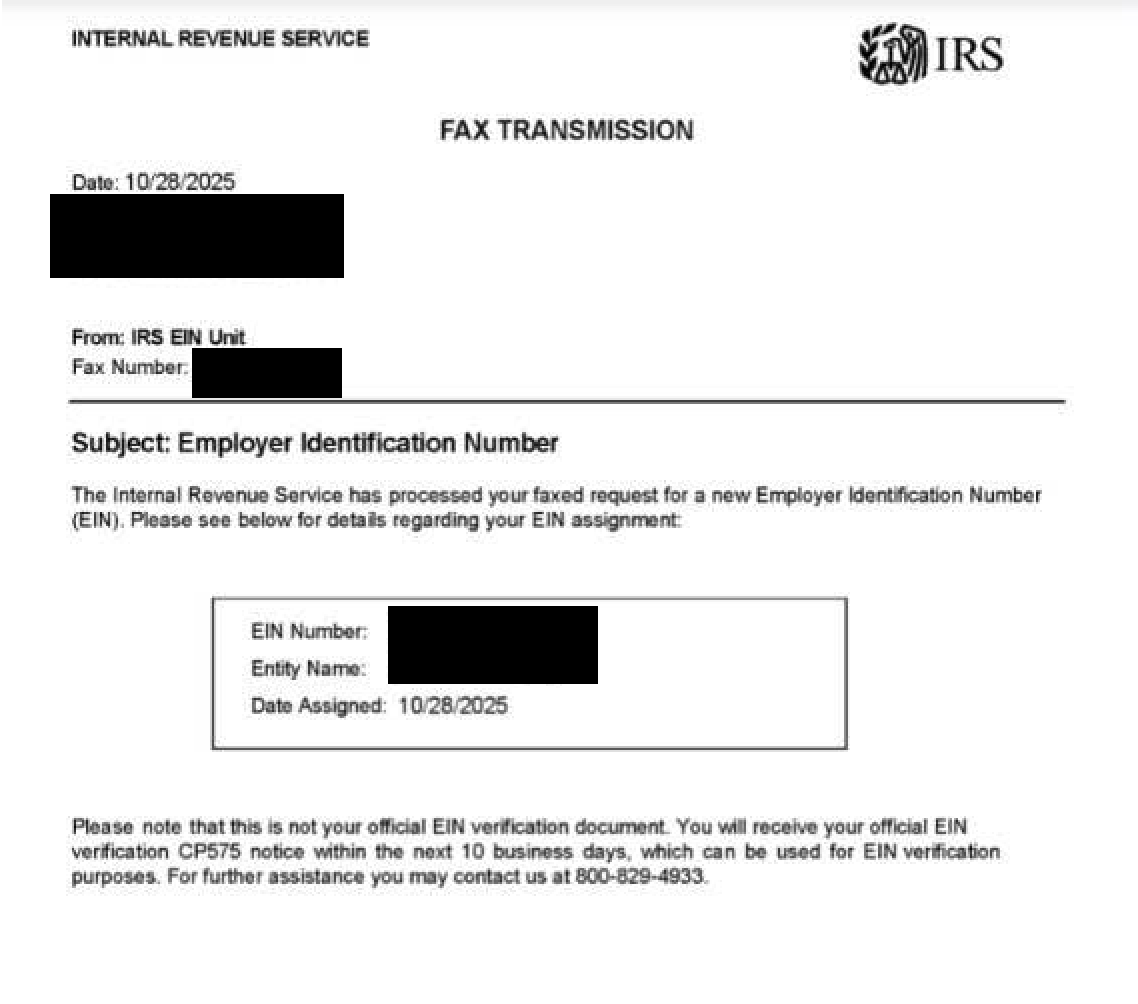
What does the EIN confirmation letter look like?
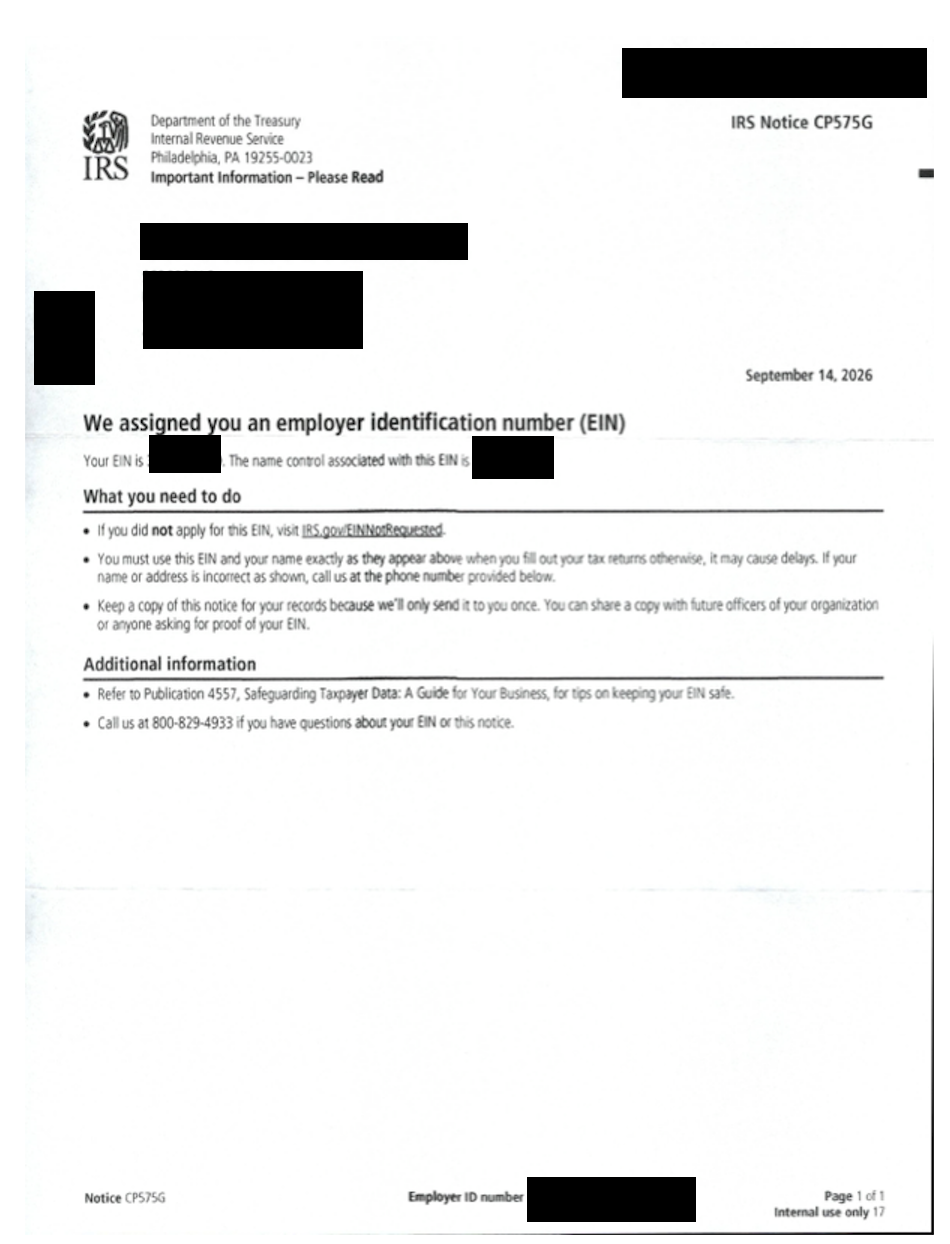
A paper EIN confirmation letter (CP 575) is usually sent by mail. When you receive it, check the EIN and entity name and keep it safely.
Let GetEIN help with your application
You can apply for an EIN directly through the IRS for free.
But preparing Form SS-4, checking the information, setting up fax service, and following up with the IRS all take time, especially across time zones.
GetEIN helps non-US residents prepare and review EIN applications, submit Form SS-4 to the IRS, and follow up on the result. You provide the company information; we handle the application documents and submission.
Get your EINGetEIN is an independent service provider and is not affiliated with the IRS.
References
Was this page helpful?